
Smart Home Setup Checklist for Canadian Households
Set up a reliable smart home in the right order — network first, hub second, devices third, automations last — with real product categories to research for every part of the house.
Quick answer
A working smart home is built in 5 layers: (1) pick a platform (Apple Home, Google Home, Alexa, or Home Assistant), (2) upgrade the network (mesh Wi-Fi + guest SSID for IoT, indoor and outdoor boosters if needed), (3) install a hub (Matter/Thread for future-proofing), (4) add devices room by room and by category — lighting, security, plumbing protection, electrical, climate, garage, and more, (5) build 3–5 daily automations. Budget $500–$2,500 for a starter setup, more for whole-home plumbing and electrical monitoring.
Want this as a printable PDF? It's free.
We'll email you Smart Home Setup Checklist for Canadian Households formatted for 8.5×11, ready to print.
A smart home falls apart when it's built device-first. Get the network and platform right first — everything else plugs in without frustration.
Pick your platform (one, not three)
- Apple Home — best if the household is on iPhone; needs a HomePod or Apple TV as hub
- Google Home — best for Android + Nest devices
- Amazon Alexa — widest device support; voice-first
- Home Assistant — most powerful, self-hosted, steeper learning curve
- Confirm every device you buy supports Matter or your chosen platform
- Avoid mixing 3 ecosystems — it doubles the setup and halves the reliability
Network + Wi-Fi (do this before any device)
- Upgrade to mesh Wi-Fi (Eero, TP-Link Deco, Google Nest) if the home is over 1,500 sq ft
- Create a separate guest / IoT SSID for smart devices (isolates them from computers)
- Confirm 2.4 GHz is available — most cheap sensors and plugs are 2.4 only
- Wired backhaul between mesh nodes if possible (Ethernet where feasible)
- Reserve DHCP addresses for the hub and cameras so they don't drift
- Enable WPA3 + strong router admin password (not the sticker default)
Add devices room by room
- Entryway: smart lock + video doorbell + entry contact sensor
- Living room: smart bulbs or switches, streaming device, motion sensor
- Kitchen: leak sensor under sink, smart smoke/CO alarm
- Bedrooms: smart bulbs, blackout blind motors, bedside voice/screen
- Basement: leak sensor near sump + water heater, temperature sensor for freeze alerts
- Garage: smart garage door opener, contact sensor
- Outdoor: exterior cameras (respect neighbour privacy — angle at your property)
- Prefer switches over bulbs where a light gets flipped manually
Every smart home category, and brands to research
- Lighting: smart switches (Lutron Caséta is the category standard) for lights flipped manually, smart bulbs (Philips Hue) elsewhere
- Outdoor & soffit lighting: permanent roofline lighting (Govee is a well-known plug-and-play option) on a seasonal schedule
- Whole-home Wi-Fi: indoor mesh nodes (eero, Netgear Orbi) plus an outdoor-rated access point for garages, sheds, or large yards
- Smart plumbing & water protection: an automatic water shutoff at the main line (Moen Smart Water Shutoff, Flo by Moen) plus leak sensors under every sink and near major appliances
- Smart sump pump monitoring: check current options from established sump pump manufacturers like Liberty Pumps if you have a sump pit
- Smart electrical: a monitoring add-on that watches your panel for fire risk (Ting by Whisker Labs) or tracks whole-home energy use (Sense)
- Smart thermostat & HVAC: Ecobee is the most common choice for room-sensor-based even heating and cooling
- Security & access: cameras and video doorbells (Ring is the deepest Alexa integration), a DIY security system (SimpliSafe), and smart locks (August, Schlage Encode)
- Smart blinds: motorized blinds or retrofit motor kits (SwitchBot) with sun-based automation
- Garage: smart garage door control (Chamberlain myQ), including retrofit kits for openers that aren't Wi-Fi enabled
- Smart pet tech: treat-tossing cameras (Furbo) and microchip-reading pet doors (SureFlap)
- Fire, smoke & CO: smart hardwired detectors that stay compatible with your existing interconnect wiring (Kidde, First Alert Onelink) instead of replacing the whole system
- Home network rack: a small wall-mount cabinet (StarTech.com and similar brands make consumer-friendly options) to organize your router, switch, NVR, and hubs instead of a tangle on a shelf
- Ecosystem hubs: Google Nest (Nest Hub, Nest Cam, Nest Doorbell, Nest Thermostat) for Google Home, Amazon Echo plus Ring/Blink for Alexa, or Apple TV/HomePod mini for Apple Home
Automations worth building (start with 5)
- Goodnight: lock doors, turn off lights, arm cameras, set thermostat back
- Good morning: raise thermostat, gentle lights, weather + calendar briefing
- Away: geofence — lock, arm, thermostat setback when everyone leaves
- Welcome home: unlock front door on arrival + turn on entry lights
- Leak alert: shut off main water valve on any leak sensor trigger (needs smart shutoff)
- Winter freeze warning: alert if any room drops below 10°C
- Kids bedtime: dim then off in bedrooms at set time
Privacy + security hardening
- Enable two-factor auth on every smart-home account
- Update firmware monthly (routers, hubs, cameras)
- Turn off features you don't use (mic on cameras, activity sharing)
- Keep a written list of every account, device, and where it lives — for you and your executor
- Position outdoor cameras to avoid recording neighbours or public sidewalks (Canadian privacy expectation)
- Physically cover indoor cameras when not needed
- Plan for outages: manual keys for smart locks, manual override for garage opener
Practical tips
- Buy one brand per device category. Mixing bulb brands turns every automation into a debugging session.
- Wire in switches instead of bulbs wherever a light is flipped manually — smart bulbs only work if nobody hits the switch.
- Test every automation with the kids and grandparents. If it needs an app to work, it isn't smart.
This page is free. Here is what CA$9 adds.
Every category of smart home device, mapped to your ecosystem, your home, and your priorities — with real product recommendations for each.
Free · this page
Smart Home Setup Checklist for Canadian Households
- Every item on this page
- Printable PDF by email (free)
- Same list for every household
- No spreadsheet to track progress
Personalized · CA$9 one-time
Smart Home Setup Checklist
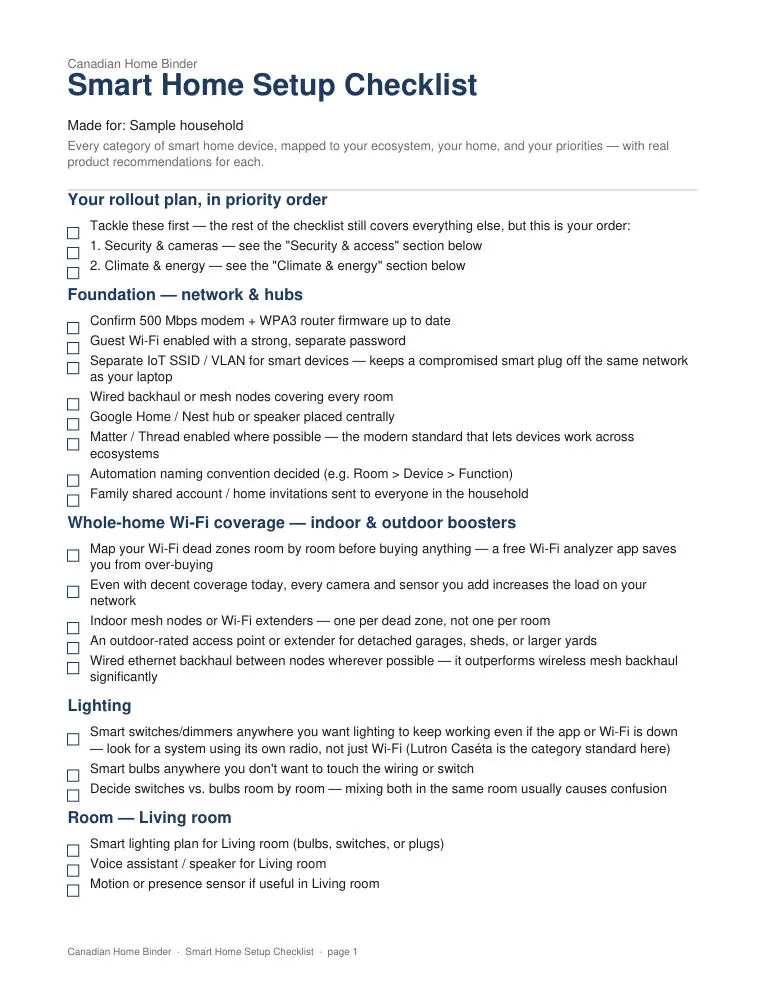
- Built from 13 quick questions about your home
- Only the steps that apply to you, in your order
- Printable PDF, formatted for 8.5×11
- Editable Excel / Google Sheets tracker
- Regenerate any time for 30 days
PDF ExcelReady in seconds after checkout14-day make-it-right guarantee
Get the free PDF first and we'll email you 15% off the personalized version (Smart Home Setup Checklist).
Get the Complete Canadian Life Admin Bundle
Get every binder and every personalized checklist we offer. Your bundle includes personalized versions built around your household, plus the original ready-to-use binder PDFs.
Shop the BundleFrequently asked questions
For most Canadian households the choice is Apple Home (if you're on iPhone) or Google Home (if you're on Android). Both support Matter, which future-proofs your device purchases.
Related checklists
- Camping Checklist for Canadian Trips
Shelter, kitchen, clothing, and the bear-safe food storage rules Canadian backcountry actually requires.
- First Apartment Checklist for Canadian Renters
What to sort before you sign, what to set up before you move in, and the furnishing list that skips what you don't need on day one.
- Meal Planning & Kitchen Organization Checklist
The weekly system, the pantry setup, and the freezer inventory that keep meal planning from collapsing by Wednesday.
- Home Inspection Checklist for Canadian Buyers
What's included by default, what's an add-on, and the questions that matter more than the report's length.
From the blog
- Best Smart Water Leak Detectors (2026)
Canadian insurers including Intact and Aviva actually discount premiums for these — but only some tiers qualify. Here's the real difference between a $66 local alarm and an $800 automatic shutoff.
- How to Set Up a Smart Home (Without the Regret)
Most smart-home regret comes from buying devices before fixing the network. Here's the order that avoids it — plus every category worth considering and the brands to research.